

My ChurchSuite is a free congregation facing tool that enables registered church members to see what’s going on in the life of the church, sign up to events, check rotas, update personal details and much more.
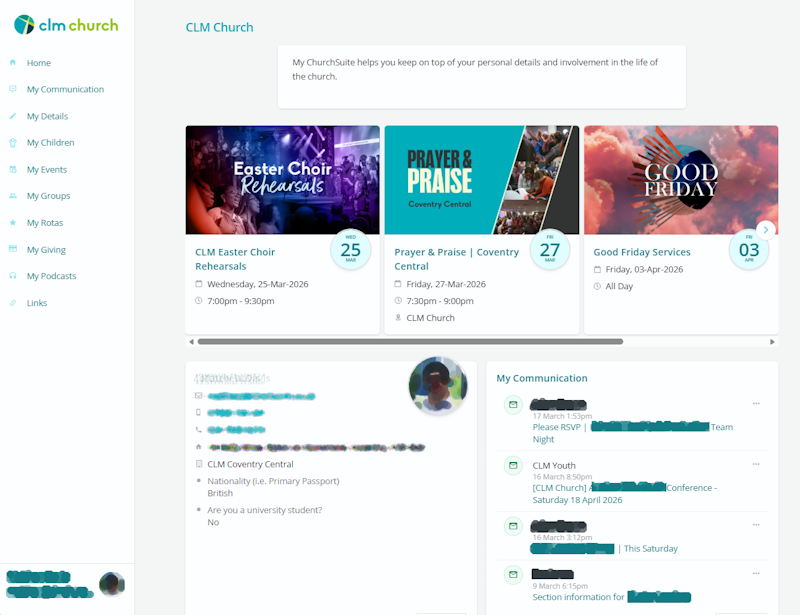
Getting Access
We encourage everyone who regularly attends or calls CLM their home church to use My ChurchSuite. It can be accessed through a web browser or by using the free iOS or Android apps (available from the App Store or Google's Play Store).
Access to My ChurchSuite is not automatic, you will need to request an invitation. If you are registered on CLM’s database (ChurchSuite), simply drop us an email and a member of team will send you an invitation. If you are not registered with CLM, we will ask you to complete a registration form first.
Your invitation email will contain a unique login link with instructions on accessing My ChurchSuite for the first time and setting of a password.
So people can put a face to a name it would be great if you could upload a profile photo – it’s quick and easy to do.
My ChurchSuite Help & Support
Click here for help and support articles for using My ChurchSuite Support
If you have any problems using My ChurchSuite or cannot find the answer in the articles above please email info@clmchurch.co.uk with a brief description of the problem and a member of the team seek to assist you.
Why ChurchSuite?
ChurchSuite is a secure, cloud-based Church Management System (or CMS) that acts as CLM’s contact database, handles communications, management of rotas, small groups, events, ticketing and much more. Used and trusted by thousands of churches across the UK and further afield, it’s a critical tool to help us communicate and plan effectively as a church.
The benefits of being registered on ChurchSuite are two way.
For you:
You can opt-in (or out) to receive CLM’s monthly e-news, keeping you abreast of all that is happening and coming up in the life of the church.
Access information about your small group and serving teams, including rotas and rota availability.
Donate via the My ChurchSuite App and set up or suspend Gift Aid declarations. You can also see your giving history (helpful for HMRC / self assessment).
If you have young persons in your household, you will be able to check-in to CLM Kids or CLM Youth by name instead of using the "Visitor" option, providing a quicker and more seamless check-in process.
You will have full control and access to your your personal information (via the My ChurchSuite App), including your children, meaning you can update allergens, consents etc.
You can sign up for courses, events and have priority access to ticketed services (for example our Watchnight Service where we have to work to strict capacity limits).
For us:
Having an accurate picture of who is regularly attending CLM helps us to ‘shepherd’ and ‘pastor’ well, and supports us with our strategic planning.
If we need to communicate with the whole congregation, for example changes of service times, parking arrangements, other emergencies, we have the permission and contact details to do so, and you are kept informed of critical information.
ChurchSuite FAQ’s
Q: Does CLM have a Data Privacy policy?
A: Yes we do, it can be found here
Q: Do I need to upload a photograph and to provide additional background information?
A: The short answer is no! But, in a large church, having a picture helps our staff team to know ‘the flock’. The additional survey information, for example on what sector I work in, or what service I typically attend, can also help us with with targeting certain interest information, and in planning / resourcing, so we use Kingdom resources effectively.
Q: I've forgotten my password.
A: Go to the login page, enter your email address and click the Forgotten Password? link. You will receive an email containing a link to reset your password.
Q: How do I manage my privacy settings?
A: You can choose which of your contact details you share – they are only visible to people who are in the same group and/or serving teams as you, plus relevant staff and ministry overseers. We encourage you to make your mobile number and email address visible to enable group communication and facilitate serving swaps.
Select My Details from the menu
Select the Privacy tab. Tick the boxes at the bottom of the page which say Make my mobile visible and Make my email visible.
Q: How do I manage my communication preferences?
A: CLM uses ChurchSuite to keep people connected and informed via texts and emails. We do our best to ensure that any communication you receive from us is relevant and helpful. You can manage your own communication preferences and choose through which means we can contact you, but please note – amending your communication preferences affects all communication sent via ChurchSuite (general CLM e-news, rota reminders and notifications from ministries), so please think carefully before changing this!
Via My ChurchSuite select ‘My Details’ from the menu.
Select the ‘Communication tab’.
Tick/untick the relevant boxes.
Or click on the unsubscribe / manage preferences on the bottom of all CLM emailed communications.
If you feel like you're receiving too much communication or communication that's unhelpful, please contact us to let us know, rather than just opting out. We're always keen to improve how we communicate.
Q: How do I delete or cancel my account?
A: If you would like your My ChurchSuite account cancelled and all your personal data removed from ChurchSuite, perhaps you’ve left the church and/or moved, or for any other reason you want to be removed from our church database, you can so by:
via My ChurchSuite under ‘My Details’ and scrolling to the bottom of the page and selecting ‘Delete Account’,
send an email to datacontroller@clmchurch.co.uk